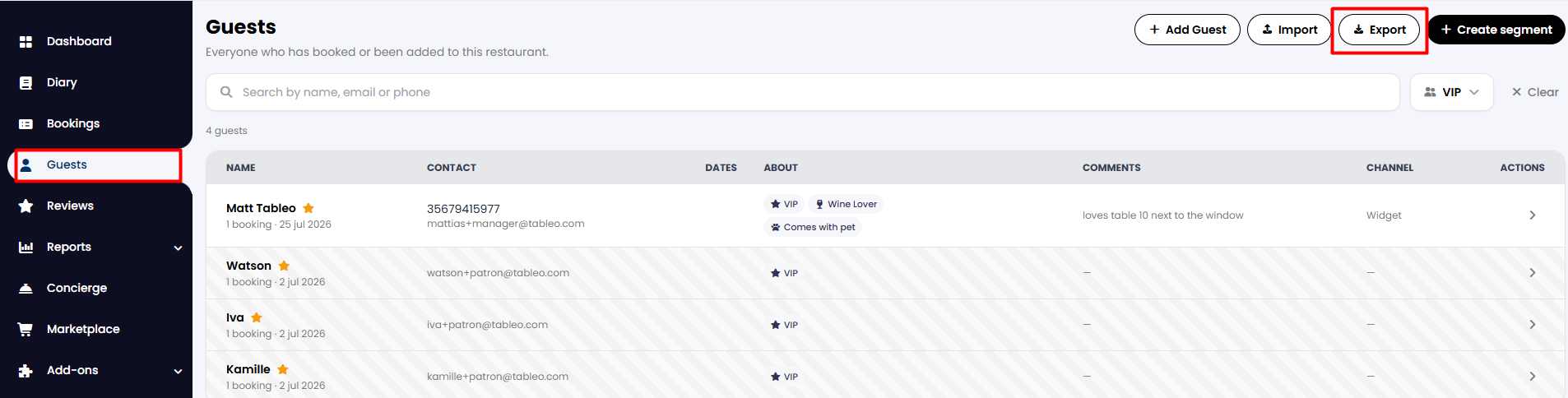
1. From the side menu, go to Guests.
2. From the top-right corner, click on the Export button.
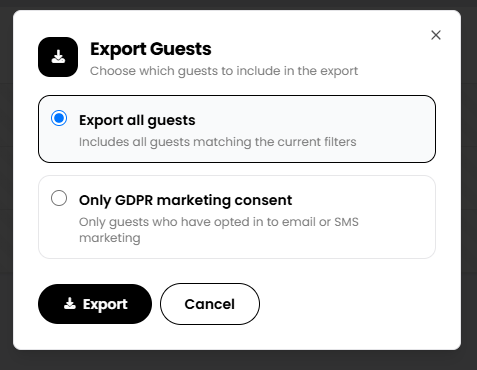
3. A new tab will open asking you to choose which group of guests you would like to export. When selected, click on the Export button below.
4. A new Excel file will be downloaded to your computer, which will contain all guests' email addresses. It will also contain a Yes/No field, so you will be able to view who has signed up to your mailing list, according to GDPR.
This exported list will also contain specifics on individual customers, such as any intolerances they might have, among other insights.

While we strive to ensure the accuracy and currency of the information in our knowledge base, some articles may contain minor discrepancies due to the constant evolution of our services and products.
Was this article helpful?
That’s Great!
Thank you for your feedback
Sorry! We couldn't be helpful
Thank you for your feedback
Feedback sent
We appreciate your effort and will try to fix the article